Enrollment
Onboarding overview
- Wait for Tiep to approve your tenant. The organization admin we onboard receives a sign in with email link that grants access to your workspace.
- Once inside the Tiep Platform, decide whether you want to create facilities manually through the UI or programmatically through the public API.
- Every facility requires its own API keys—keep that in mind as you design your integration workflow.
Create facilities
You can provision facilities either manually or through the API. Each approach ultimately produces the same facility record and enables you to continue with the rest of the integration.
Create a facility in the UI (simpler)
- In the platform, go to Facilities and select New Facility.
- Complete the form with the facility metadata (name, HIS identifier, location, and optional tags).
- Submit the form. The facility appears in the list immediately and is available for further configuration.
Create a facility via API
If you want to programmatically create a facility then you need an organization API Key.
- Sign in to the platform with the admin account that manages your tenant.
- Navigate to API Keys in the left navigation and open the Organization tab.
- Select Create API key, enter a descriptive label (for example,
Provisioning), and confirm. - Copy the key immediately—the full value is displayed once—and store it in your secret manager.
Now that you have an organization key, you can create as many facilities as you need.
- Issue
POST https://api.tiep.ai/v1/facilitieswith theX-API-Keyheader set to the organization API key you generated earlier. - Provide the facility metadata in the request body (internal identifier, name, HIS identifier, location metadata, etc.). The
internal_idmust match your facility id so future API calls can reference it reliably. - Use the internal facility id whenever you create doctors or launch consultations scoped to that site.
Facility API keys
If you use Tiep with your own UI, you will need a facility API key.
Skip this section if you're using Tiep's UI via webhook.
Once a facility exists, create one or more facility API keys to scope doctor creation, consultations, and report generation.
Generate a facility API key
- Open the facility and navigate to API Keys.
- Select Create API key, provide a descriptive name, and confirm.
- Copy the generated value immediately—this is the only time the full key is displayed.
- Store the key securely. You need it to create doctors assigned to this facility and to call Tiep AI models (for example, transcription and report extraction endpoints).
- Rotate keys periodically and delete unused keys to keep your workspace secure.
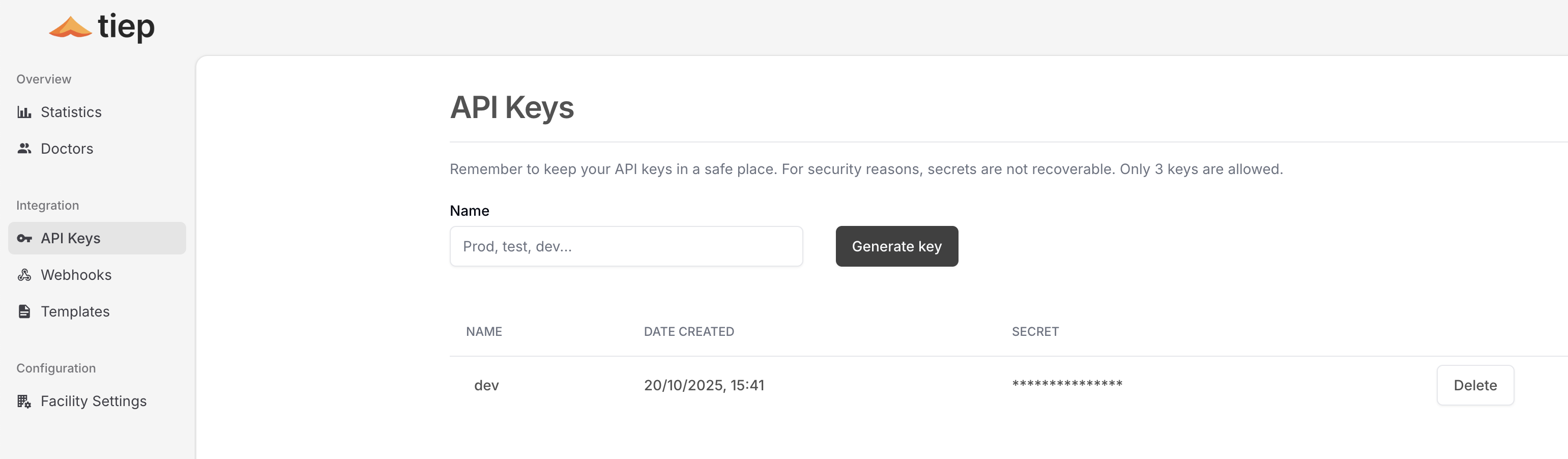
Each facility can maintain up to three active API keys. Treat them like production secrets and rotate them regularly.
Ready to generate reports? Continue with the forms guide to understand how to set the form of the report.